You’ve probably heard that SSD drives are a lot faster than HDD, but that’s no reason to hate your older computer that uses an old-fashioned hard drive.
Auslogics Disk Defrag Ultimate is an essential tool for optimizing and maintaining your hard disks. The program will defragment files, consolidate free space, and optimize file placement to make your hard disks run at peak performance.
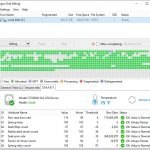
every single feature or action is described in detail, interactive cluster maps allow you to click on individual blocks to view files located in them along with their status and an option to defragment individually.
Auslogics Disk Defrag Ultimate comes with four different types of optimization techniques (by Prefetch layout, by last file access or change time, and by disk zone), as well as a capability to defragment locked system files (such as Windows Paging, Hibernation, MFT and Registry files).
Specification Features
The feature list of Auslogics Disk Defrag Pro & Ultimate
Optimize by Access Time method to have faster access to frequently used files.
Optimize by Prefetch Layout algorithm to speed up your system loading and application startup
Optimize by Change Time to reduce further file fragmentation.
Optimize by Disk Zone algorithm to manually specify which file types or even individual files should be written to the faster part of the disk.
Thorough free space consolidation
Free Space Consolidation algorithm to greatly slow down the process of file fragmentation.
Merges free space on your disk into a large contiguous block to write new files without fragmentation.
You can disable defragmentation to make the consolidation process go faster.
Single file or folder defragmentation
Save your time by defragmenting only the files you want.
Defragment a single file, several files or an entire folder.
Defragment certain files to speed up an application and there is no need to defragment the entire hard drive.
Disk error check and repair
Set the program to check the disk for errors prior to defragmenting.
Ensures that there won’t be any data loss if the disk happens to have errors.
Special Algorithms for SSD
Special SSD optimization algorithm to reduce the number of write operations during defragmentation,
Prevents excessive wear and allows to extend the disk’s lifespan.
Set the SSD not to be displayed in the list of drives at all if you prefer not to include your SSD in defrags or optimization
Disk Cleanup before Defrag
Set the program to remove temporary files prior to defragmenting.
The program won’t have to waste your time processing junk files.
Wipe Free Space on Drives – Pro Edition Only
Wiping traces of previously deleted files from the free space on your drives helps protect your privacy.
Schedule Automatic Defrags
Set the program to run precisely at the specified time, or alternatively
Auto Defragmentation mode to enables the program to defragment and optimize your disks in real-time.
Adjustable resource usage restrictions, any of the scheduled tasks won’t ever disturb you while you work or play on your computer.
Boot-time or offline defragmentation
Defrag even the system files that are normally locked by Windows.
Offline defrag runs on system startup, before the operating system loads
Streamline the following system files: MFT files, Paging file, Hibernation file and Windows Registry files.
Defragmenting system files will make your Windows more responsive, speed up system loading and overall performance.
Defragmentation Wizard (Ultimate Edition Only)
A few simple clicks to disk optimization & defrag.
The program suggests optimization algorithms that will work to achieve optimal disk and system performance.
List of Fragmented Files (Ultimate Edition Only)
Lists all fragmented files after performing disk analysis.
Selecting a file from the list will highlight its fragments’ location on the cluster map.
Find the most fragmented files and their paths by sorting through the list.
Choose files to defragment and files to add to the ignore list.
Fragmentation Prevention (Ultimate Edition Only)
Specify the amount of free space to be left after certain files to ensure that these files have room to expand.
This effectively prevents fragmentation by allowing new data to be written in the same location as the original file it’s being added to, instead of somewhere else on the drive.
Resource Management (Ultimate Edition Only)
Easily control the load on system resources produced by the defragmentation process.
Restrict the use of system resources by the program when you are at your PC, or lift any restrictions to defrag your disks faster.
There are 4 pre-defined resource usage profiles you can choose from.
Create your own profile with specific CPU and disk usage restrictions.
Restrict the launching defragmentation process when a specified application is running or your laptop switches to battery power.
Performance Charts (Ultimate Edition Only)
Easily track performance improvement and your system state through detailed reports and charts provided by the program.
View the degree of file and free space fragmentation, size of the largest contiguous free space block available on your disk, and a number of files processed during each operation.
All reports can be viewed, printed, and stored in a format convenient for you.
VSS-Compatible Algorithm (Ultimate Edition Only)
Equipped with algorithms designed specifically for Volume Shadow Copy Service (VSS)-enabled drives.
Minimize the growth of the VSS storage area caused by file movement during a defragmentation and reduces the chance of overwriting previous VSS snapshots.
Eliminates the problem of free space shrinking during defrag, which users may experience with some other defragmenters.
Requirements
Before installing this software, check that your computer meets the following hardware and software requirements:
Operating System Minimal
Windows 7 (32-bit and 64-bit supported) 25 MB of available hard-disk space
Windows Vista (32-bit and 64-bit supported) 256 MB RAM or more for Windows XP
Windows 2008 (32-bit and 64-bit supported) 512 MB RAM or more for other Windows versions
Windows XP (32-bit and 64-bit supported)
How to install
Click on the Get this item button in this offering box and you will download the installation file
Once downloaded, Install it and launch the program after installation
Use the following license key to activate the full version: Q2NGK-8DD87-JVU8U-9LZP6-FTRSH


 yooffers