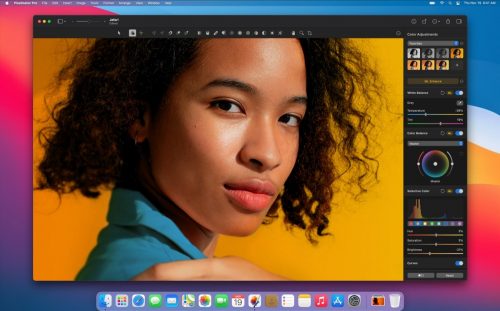
Giveaway for Mac : Pixelmator Pro 2 – Free Full Version

Deal Score0
Deal Score0

Spefication Features

Pixelmator Pro 2 is a beautiful, easy-to-use, and very powerful image editor for the Mac. With it’s cutting edge technologies, Pixelmator Pro is the most modern way to create, edit, and enhance your images. It’s is great for any of us who love editing images on a Mac — whether total beginners or advanced users.

Look forward to the current full version of professional photo editing for macOS: Pixelmator Pro 2 offers all the tools to not only optimize photos in RAW format but also to enable complex photomontages and extensive image optimization. 

  • Photo Editor
    • Lightness – Perfect the lighting in your shots.
    • Levels – Great adjustment for almost any photo as it’s designed to be both versatile and easy to use.
    • Curves – Adjust almost every aspect of the lighting and colors in your shots with an incredible level of depth and precision.
    • Selective Color – Easily adjust precise color ranges in your image, like the blues, yellows, or greens, without affecting any of the others.
    • White Balance – Fix white balance in shots with unwanted color casts.
    • Color Balance – Change the balance of all the colors in your photo by adjusting the intensity of red, green, blue, cyan, magenta, and yellow.
    • Hue & Saturation – Shift all the colors in your image along the color spectrum, make colors richer and more brilliant, or adjust their vibrancy.
    • Replace Color – Replace any color in your image with any other.
    • Channel Mixer – Mix the balance of the red, green, and blue color channels to create intense color effects in your images.
    • Black & White – Create beautiful black and white photography, even from your color photos.
    • Vignette – Add an artistic vignette around photos to create a retro look or draw attention to your subjects.
    • Color Monochrome – Turn all the colors in your image into shades of a single color.
    • Sepia – Instantly give your photo an aged, vintage look by changing all the colors into shades of sepia.
    • Invert – The Invert adjustment instantly inverts all the colors in your image in their opposite colors.
    • Fade – Wash out the contrasts in your photo to give it a faded look.
    • Sharpen – Quickly make all the details in your photo clearer by increasing overall sharpness.
    • Grain – Add a touch of natural film grain to emulate the look of analog film in your digital photos.
  • Drawer & Illustrator
    • Full set of vector tools for creating resolution-independent designs
    • Resolution Independent – No matter how much you resize each shape or even the entire vector designs.
    • SVG Support – Open SVG files, edit their shapes and paths, and export while keeping all their vector data.
    • Smart Shapes – Quickly add a star and various polygon shapes, arrows, speech bubbles, and other shapes to your compositions, then customize them in any way you want.
  • Layer-based editing.
    • Layer-Based Editing – Use simple building blocks – shape, text, and image layers – to create stunning compositions and designs.
    • The Arrange tool – Automatically select layers by clicking them on the canvas, intelligently snap layers into position as you move them around, and even lets you align and distribute layers automatically.
    • Layer Styles – Nondestructively customize the look of any layer in your image by adding fills, strokes, and shadows, or any combination of multiple styles.
  • Painting Tool
    • Beautiful Brushes – A stunning collection of over 100 handcrafted, dual texture brushes — choose from a dazzling array of gorgeous paintbrushes, watercolors, markers, pencils, crayons, basic brushes, and more.
    • Pixel Tool – Automatically lines up each pixel you place on the canvas, no matter how big or small the pixels are.
    • Graphics Tablets – Support for pressure sensitivity and tilt, you can paint, sketch, and draw just like you would on paper or a real-life canvas.
  • Machine Learning Powered tool
    • ML Enhance – Automatically enhance photos like a pro photographer.
    • ML Super Resolution – Magically increase the resolution of images while preserving sharpness and details.
    • ML Match Colors – Quickly and easily match the colors and style of any photo.
    • ML Denoise – Effortlessly remove camera noise and image compression artifacts from photos.
    • Quick Selection Tool -Quickly make accurate selections with ease.

(Get Giveaway) Pixelmator Pro 2 for Mac - Full Version

$0 $39.99
    •  Get this item button and you will go to the registration page
    • The registration page is in German, you may need a translator
    • On the registration page, fill in the form with your email address
    • Give a check on the 'Ich bin damit einverstanden...' and 'Ich bin mit der Speicherung...'
    • Click on the 'JETZT GRATIS RUNTERLADEN' button and you will receive the confirmation email
    • Open the email from FalkeMedia and click on the 'Jetzt aktivieren' button to get the full version download.
    • On the new opened page, Scroll down and click on the 'Pixelmator Pro 2 herunterladen (macOS)' button to download the Mac App.
    • Download & install the app on your mac to activate the full version.
We will be happy to hear your thoughts

Leave a reply

Yo Offers: Digital Deals & Freebies
Logo



