
 yooffers
Description
OCR technology to convert scanned PDF paper books and documents into editable electronic text files fast and easily. PDF OCR has a build-in text editor which allows you to edit ocr result text without MS Word. PDF OCR also supports batch mode to OCR all pages of pdf file to text at a time. PDF OCR has a Scanned Image To PDF Converter, which means you can create your own scanned PDF books.
Specification Features
If you decide to download your PDF OCR program today, there are special benefits to expect.
– After turning your scanned PDF files to an editable electronic file, go on and correct it. It has an integral Text Editor that can let you amend text without MS Word or WordPad.
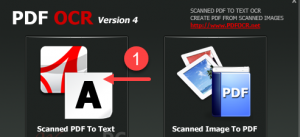
– With only two clicks, you will be able to OCR your PDF file to a text file. So the program is easy to use.
– PDF OCR uses an extremely quick OCR engine that is ninety-two percent quicker than any other OCR software tool. In forty-five seconds, you can process more than 10 pages.
– It offers three modes: single page, page range and All page ocr/batch Mode (enables you to convert one file or several PDF file pages at once). The fact that it can do page selection is advantageous and convenient.
– The program supports more than ten languages. So, apart from English, the PDF OCR is compatible with French, Italian, German, Spanish and other popular languages. This makes the tool universally useful.
– Supports any Page Size. Hence, you can OCR your A4s, A3s, B3s, B4s, B5s and other types of PDF scanned pages.
Note of PDF OCR
We need to be honest about that the PDF OCR program doesn’t only have advantages. First of all, it can’t recognize text one hundred percent correctly. Hence, its Optical Recognition Technology can only recognize text from images and graphics at a RR (recognizable rate). This rate largely depends on the PDF text fonts and background among other things. Note that PDF OCR is only capable of identifying text from PDF files and that it sees images and graphics as text as well. This is why you are likely to receive some unknown characters that you can remove in your Text Editor. So, get your OCR program today and turn your PDF files into electronic files you can easily edit.
How to get License Key
PDF OCR Free License Key
- Product name: PDF OCR 4.7
- Website: https://www.pdfocr.net/
- License type: lifetime
- Platform: Windows
- Giveaway link: n/a
- License code – last updated: Apr 20, 2021
Giveaway version- Non-commercial use
- No free updates
- No free tech support
- Register before this offer has ended
- Download the giveaway installer and PDF OCR license key by the above download link.
Install the software on your computer and launch it, for the first time let’s choose as the image below to register it:
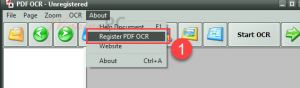
- From the menu bar choose “About\Register PDF OCR”. Enter the PDF OCR license key in the text file and press OK:
Enjoy it for free!
System requirements
– Microsoft Windows XP SP3
– Windows 2003
– Windows 2000
– Windows ME
– Windows Vista
– Pentium Processor
– Pentium 4 or higher
Having the right OS is not all; the PC has to have enough RAM and hard disk space. In this case, you need 128 RAM or more. The much recommend is 256MB RAM. Second, you need 20MB of hard disk space to install and store your OCR program.

Giveaway PDF OCR - OCR PDF (License Key)
- License #1: (v4.7, updated: Apr 20, 2021)
Code: XTRNNBOC3422VMQ
Installer: PDF OCR_4.7.exe - License #2: PDF_OCR_4.7.zip (updated: June 11, 2020)





