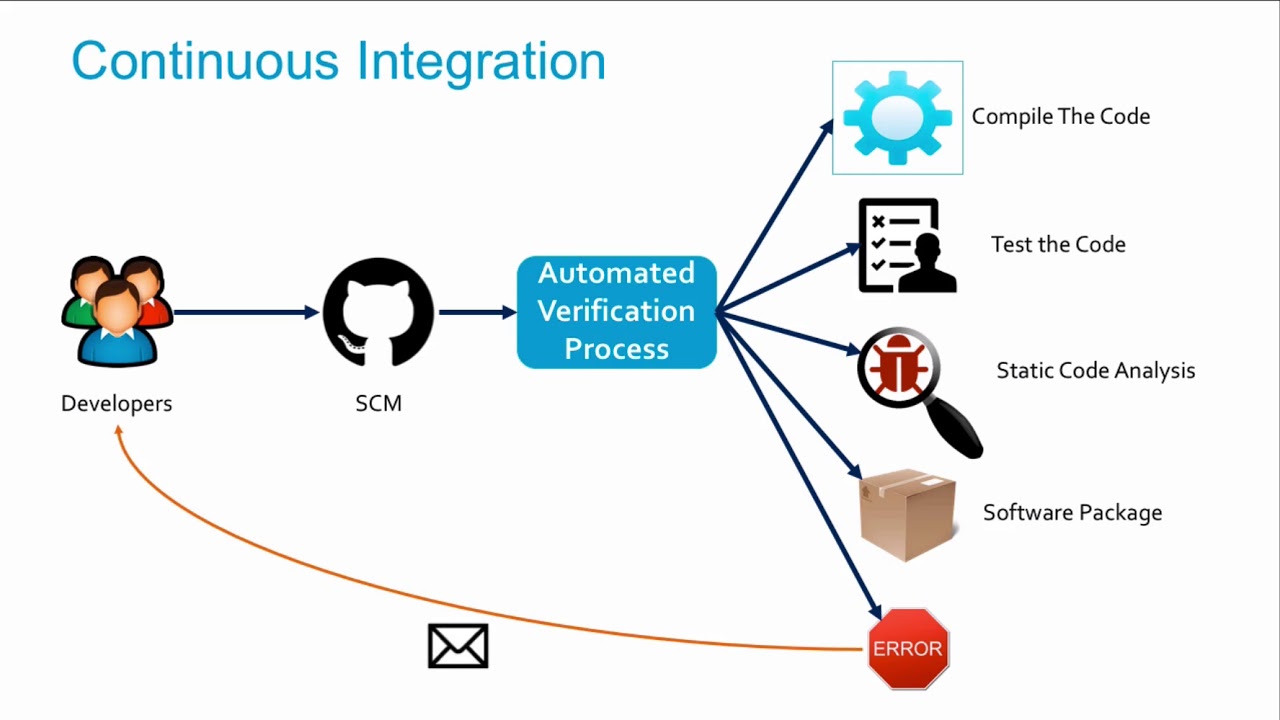
Why need CI & CD – describe the problem and how can we solve it useing CI & CD tools;
CI & CD testing – we will find out why do we need Continuous Integration and what was before. What benefits can we get from this approach?;
Why Jenkins – we will find out why we choose Jenkins as the main CI tool;
Download, install, configure – I will show how to install Jenkins CI on GCP Compute Engine;
Create first Jenkins job – we will create the first job in Jenkins. We’ll run it and see the results, find out how to analyze these results;
Build triggers – we will cover different Jenkins build triggers. There are a few different types: On-demand run; Other job finished; Cron schedule; SCM check;
Cron syntax – I’ll show Cron syntax, what is it and how can we use it with Jenkins;
Git integration – I’ll show how to configure your Jenkins with Git and GitHub and fetch your repository. We will take a look on GCP server where Jenkins is stored and how it handles workspaces and jobs;
Artifacts – we will take a look at Jenkins artifacts;
Build pipeline view – I will show to build a pipeline view. First of all, I will show what is pipeline view and how it can be configured in Jenkins CI/CD tools.
Parameterized jobs – I’ll show how to configure Parameterized jobs in Jenkins;
Jenkins security – I’ll show how to restore access to your server;
Nodes – I’ll show how we can distribute loading between different nodes;
Jenkins backup – we will learn how to configure backups for Jankins and config history;
Uninstall Jenkins – how to clean up everything and remove Jenkins and GCP instance;
Additional – a few interesting next steps;
Technical interview questions – most popular interview questions about CI & CD.
Course Content
- Introduction
- Why need CI & CD
- CI & CD testing
- Continuous integration vs Continuous delivery vs Continuous deployment
- Why Jenkins
- Download and install Jenkins CI on GCP. Tutorial
- Configuration. Change language interface.
- Create the first Jenkins job
- Build triggers
- Cron syntax
- Git integration
- Artifacts
- Build pipeline view
- Parameterized jobs
- Security
- Backups and config history
- Nodes on GCP Compute engine with SSH
- How to uninstall Jenkins
- Most popular interview questions
Instructor
Maksym Rudnyi is a Senior Software Engineer with more than 8 years of production experience in Web Development. He is experienced both in frontend and backend technologies.
He likes to share his experience with others through his courses in Web Development and specifically JavaScript. Use this knowledge to improve yourself as a professional developer.
Important Details
- Length of time users can access this course: lifetime
- Access options: web & mobile streaming
- Certification of completion included
- Redemption deadline: redeem your code within 30 days of purchase
- Updates included
- Experience level required: beginner
Requirements
- Basic computer skills
- Ability & access to install software (admin rights required)
There are no reviews yet.